Trend Advisor for Amibroker (AFL)
kaiji over 16 years ago Amibroker (AFL)
Know which stage of market you are currently in. 1) Recovery 2) Accumulation 3) Bullish 4) Warning 5) Distribution 6) Bearish
By taishunszeto
Screenshots
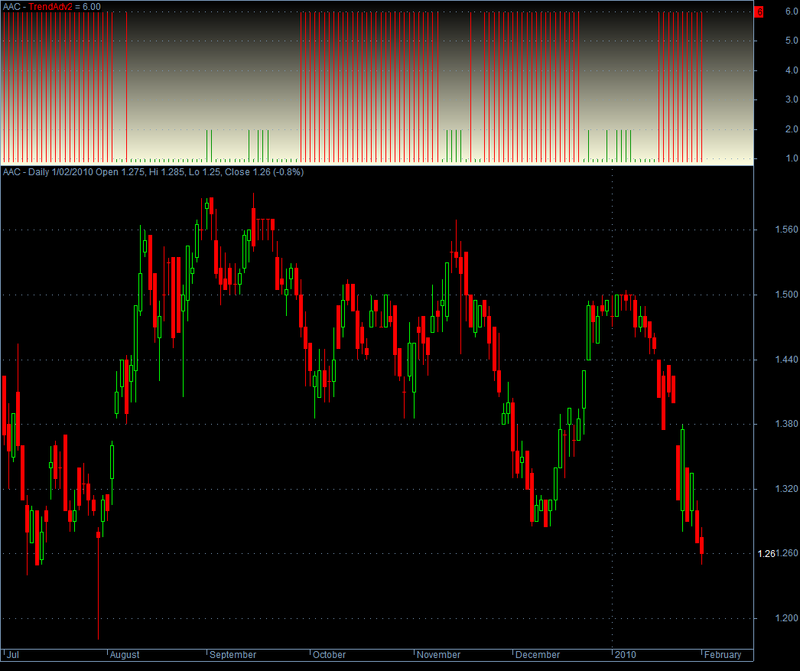
Indicator / Formula
Copy & Paste Friendly
pointer[0] = 0;

/* Phase filter */

Cond1 = Close > MA(Close, 50)AND NOT(Close > MA(Close, 200))AND NOT(MA(Close, 50) > MA(Close, 200));
Cond2 = Close > MA(Close, 50)AND Close > MA(Close, 200)AND NOT(MA(Close, 50) > MA(Close, 200));
Cond3 = Close > MA(Close, 50)AND Close > MA(Close, 200)AND MA(Close, 50) > MA(Close, 200);
Cond4 = NOT(Close > MA(Close, 50))AND Close > MA(Close, 200)AND MA(Close, 50) > MA(Close, 200);
Cond5 = NOT(Close > MA(Close, 50))AND NOT(Close > MA(Close, 200))AND MA(Close, 50) > MA(Close, 200);
Cond6 = NOT(Close > MA(Close, 50))AND NOT(Close > MA(Close, 200))AND NOT(MA(Close, 50) > MA(Close, 200));


for (i = 1; i < BarCount; i++)
{

  if (Cond1[i])
    pointer[i] = 1;
  if (Cond2[i])
    pointer[i] = 2;
  if (Cond3[i])
    pointer[i] = 3;
  if (Cond4[i])
    pointer[i] = 4;
  if (Cond5[i])
    pointer[i] = 5;
  if (Cond6[i])
    pointer[i] = 6;

}

/* Plot Graphic */
dynamic_color = IIf(pointer < 4, colorGreen, colorRed);
Plot(pointer, "TrendAdv2", dynamic_color, styleHistogram, Null, Null, 0);
SetChartBkGradientFill(ParamColor("BgTop", colorWhite), ParamColor("BgBottom", colorLightYellow));
5 comments
Leave Comment
Please login here to leave a comment.
Can you please explain how the lines behave and what it gives as signal whether accumulation, trending, up or down. I shall be obliged at my mail removed for your safety
Did you read the description? It explains everything there. The red lines which have a value of 6 means the market is bearish and the short green lines, which have a value of 2 mean the stock is in accumulation phase. I hope that explains it.
Best Afl according to me
thanks, it’s help me more
It is My choice