Adaptive Price Zone (APZ) for Amibroker (AFL)
AndrewThomas over 15 years ago Amibroker (AFL)
In “Trading With An Adaptive Price Zone,” author Lee Leibfarth presents a trading technique that uses adaptive bands based on the double-smoothed exponential moving average and the classic ADX indicator.
Implementing the adaptive price zone technique using AmiBroker Formula Language is easy and straightforward. Listing 1 shows ready-to-use code. The formula is for both the indicator and the trading system.
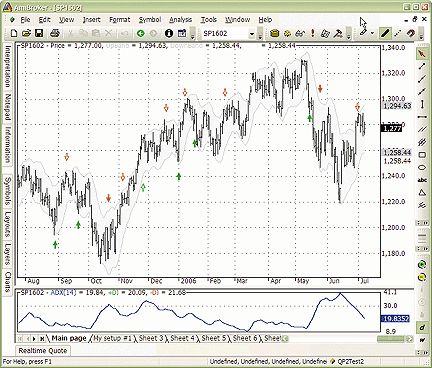
Screenshot shows a daily price chart of the S&P 500 continuous contract with adaptive price zone bands and trade entry/exit arrows (upper pane) and the ADX indicator (lower pane).
Screenshots
Indicator / Formula
// Adaptive Price Zone Indicator & system
////////////////////////////////
function DblSmoothEMA( price, Length )
{
   period = IIf( Length < 0, 1, sqrt( Length ) );
   smooth = 2 / ( period + 1 );
   return AMA( AMA( price, smooth ), smooth );
}
price = ParamField("Price");
period = Param("period", 20, 2, 100 );
BandPct = Param("width[%]", 1.4, 0.1, 4, 0.1 );
DsEMA = DblSmoothEMA( price, period );
RangeDsEMA = DblSmoothEMA( H - L, period );
UpBand = BandPct * RangeDsEMA + DsEMA;
DnBand = DsEMA - BandPct * RangeDsEMA ;
Plot( C, "Price", colorBlack, styleBar );
Plot( UpBand , "UpBand", colorLightGrey );
Plot( DnBand , "DownBand", colorLightGrey );
// you may uncomment lines below to get 'cloud' chart
// if you are using version 4.80 or higher
// PlotOHLC( UpBand, UpBand, DnBand, DnBand, "Band",
// ColorRGB( 245,245,255), styleCloud );
SetTradeDelays( 1, 1, 1, 1 );
ADXThshold = 30;
ADXValue = ADX( 14 );
Buy = ADXValue <= ADXThshold AND Low <= DnBand;
Short = ADXValue <= ADXThshold AND High >= UpBand;
Sell = Cover = ADXValue > ADXThshold;
if( Status("action") == actionIndicator )
{
 Equity(2);
 PlotShapes( Buy * shapeUpArrow, colorGreen, 0, DnBand, -24 );
 PlotShapes( Sell * shapeDownArrow, colorRed, 0, UpBand, -24 );
 PlotShapes( Short * shapeHollowDownArrow, colorRed, 0, UpBand, -24 );
 PlotShapes( Cover * shapeHollowUpArrow, colorGreen, 0, DnBand, -24 );
}
1 comments
Leave Comment
Please login here to leave a comment.
Dear Andrew or friends
why the chart not show? no arrow, no bollinger, just price… could you please help me??
thanks
ss